浜松ホトニクスc12880maをPythonで使う (5)
 kimi
kimiタイトル変えた...
PC側Python、Raspberry Pi Pico側がMicro PythonでC12880MAを動かす。PC側はデータ処理でスペクトルの表示。Pico側はC12880MAの制御とPC側へのデータ送信。あと、シャッターの制御などもPicoの仕事。
スペクトルメータだけでなく、もっと様々な外部機器に対応できるように汎用性を持たせてみる。クラスにはport_statusとperipheral_messageを持ち、それぞれのセンサーや機器の接続先のシリアルポートの状態、機器の状態を人にも理解しやすいようにした。peripheral_messageの内容はport_statusリストの最後にも同様な内容を持たせてある。スペクトルメータなども複数接続対応可能に出来るのである。たぶん。
現状考えているシステムでは新しいデバイスとそれが収集するデータに関してはセンサーに付随するRaspberry Pi PicoのMicroPython側とデータベースの設定のみの変更で対応可能としたい。できるのか... 分光計は難しいけどね。温度、湿度、気圧、電圧などの単純なものなら可能であろう。おそらく。
その前に、Linux以外のOSでの接続確認を行わなければならないのであるがな...
import platform
import serial.tools.list_ports


class serial_ports_info():
    def __init__(self):

        self.OS = platform.system()
        self.Version = platform.version()
        self.Platform = platform.platform()
        self.port_status_message = "Initialize class"

        self.ports_refresh()

    def scan(self):
        for p in self.ports:

                print(": %s" % p)
                print("device: %s" % p.device)
                print("name: %s" % p.name)
                print("description: %s" % p.description)
                print("hwid: %s" % p.hwid)
                print("vid: %s" % (None if p.vid == None else hex(p.vid)))
                print("pid: %s" % p.pid)
                print("serial Number: %s" % p.serial_number)
                print("location: %s" % p.location)
                print("manufacturer: %s" % p.manufacturer)
                print("product: %s" % p.product)
                print("interface: %s" % p.interface)

    def ports_refresh(self):

        self.ports_status = []
        self.ports = serial.tools.list_ports.comports()

        for p in self.ports:
            if p.manufacturer == "MicroPython":
                try:
                    uartport = serial.Serial(
                        port=p.device,
                        baudrate=115200,
                        bytesize=serial.EIGHTBITS,
                        parity=serial.PARITY_NONE,
                        stopbits=serial.STOPBITS_ONE,
                        timeout=3
                        )

                    # buffer clear
                    uartport.reset_input_buffer()
                    uartport.reset_output_buffer()

                    try:

                        uartport.write(("identify" + "\n").encode("utf-8"))
                        device = uartport.readline().decode('utf-8').rstrip('\r\n')

                        if device == 'identify':
                            device = "Unknow Device on MicroPython"
                            self.uart_message = "Cannot connect to MicroPython device on port %s on %s." % (p.device, self.OS)
                        else:
                            self.uart_message = "Can connect to %s on port %s on %s." % (device, p.device, self.OS)

                        uartport.close()

                    except serial.SerialException:
                        self.uart_message = "Failed to receive data."
                        uartport.close()

                except serial.SerialException:
                    self.uart_message = "Failed to open serial port."

            else:
                device = "Unknown device"
                self.uart_message = "Cannot connect."

            self.ports_status.append([p, device, self.uart_message])

if __name__ == '__main__':

    pc = serial_ports_info()

    for port in pc.ports_status:
        print(port)
実行結果
[<serial.tools.list_ports_linux.SysFS object at 0x7efce2613f40>, 'Unknown device', 'Cannot connect.']
[<serial.tools.list_ports_linux.SysFS object at 0x7efce26ba530>, 'Unknow Device on MicroPython', 'Cannot connect to MicroPython device on port /dev/ttyACM1 on Linux.']
[<serial.tools.list_ports_linux.SysFS object at 0x7efce26ba5f0>, 'Spectrometer', 'Can connect to Spectrometer on port /dev/ttyACM0 on Linux.']
ちょっと、コードを大きく変えた、名前とかも… MicroPythonが動いているが、対象外のPicoの場合、つまり、’Identify'に返事しないPicoが繋がっていると返事を待ち続ける問題があったので、timeoutを3秒に設定した(45行目)。timeoutした場合、エコーバックしてくるようなので、その様な場合、Unkonw device...とCannot connet...のメッセージを返すように変更した(54行目〜)。全体的にもう少し、スッキリさせたい...
<追記>
Linux以外での動作確認だが、VirtulBoxにWindows10を入れていたのだが、シリアルポートを認識させることに難儀している。設定の操作ができない。やはり実機を用意しなければダメそうである。レーザー加工機などの制御用PCはネットワーク接続していないので、Pythonの導入が面倒なのだ。
<追記-2>
Windowsでの動作確認は未だできず。
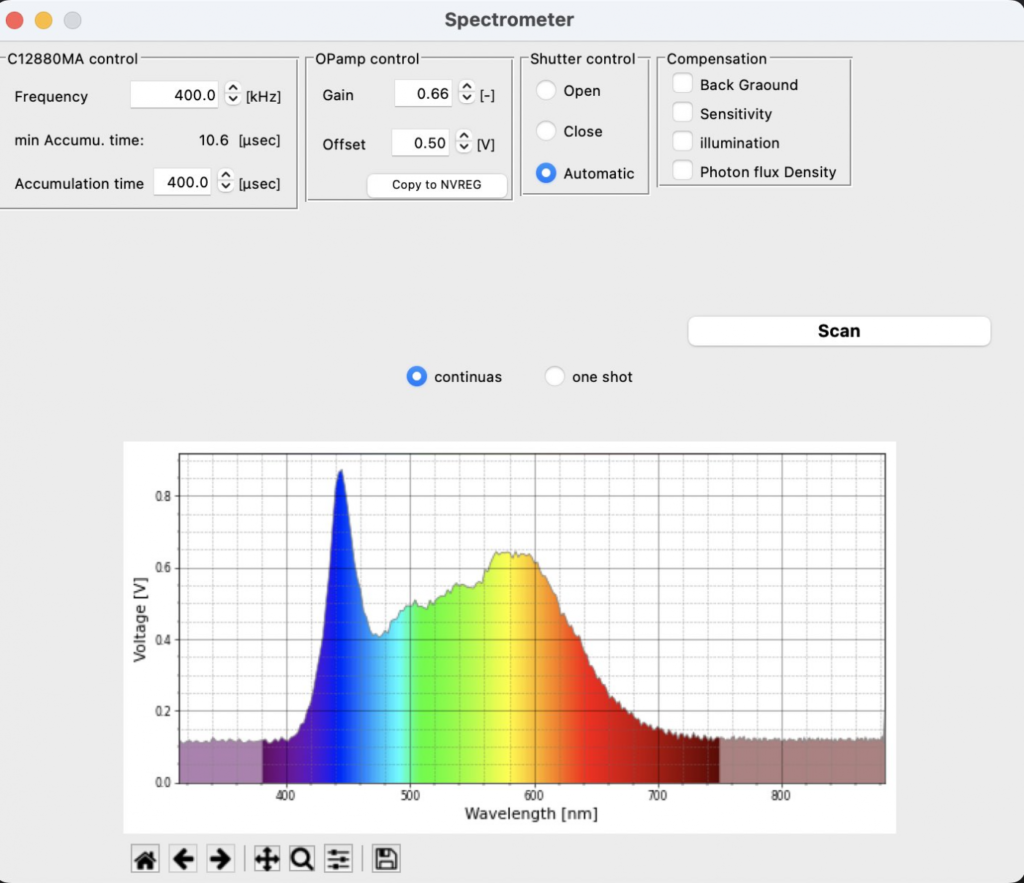
macOSでは動作を確認できた。ただし、部品のレイアウトがおかしくなる。
一応、シリアル通信周りのマルチプラットフォーム化はできた模様。
次はexe化か、レイアウトの崩れもなんとかしないとな...