Ubuntuにおけるファイル共有できない問題…
 kimi
kimi背景
現在、ノートPCが4台、デスクトップ1台でUbuntu 22.04 LTSが動作している。ノートPC2台はファイル共有が出来ているが、デスクトップとノートPC1台は同じ設定であるのにもかかわらず、ファイル共有が出来ていない。残り1台は不明…
また、マッキントッシュが2台稼働中であるが、そのうちの1台はファイル共有中である。
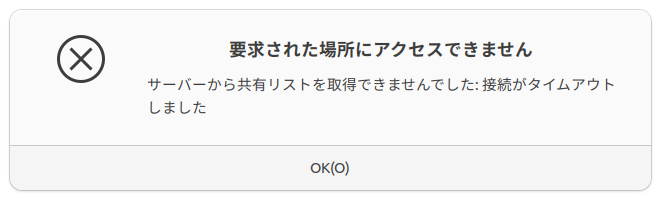
具体的には次のような症状である。ファイルにて、”+他の場所”を開くと、PCは現れるのだが、ダブルクリップすると次のようなダイアログが表示されてしまう…
以上の問題を解決するために調査した結果をまとめた。
(現状、解決できていない…、解決した。すごく単純な理由だった…)
基本情報
Ubuntuにおけるファイル共有は’ファイル’から右クリックで、’このフォルダーを共有する’を設定する事で実現できる。
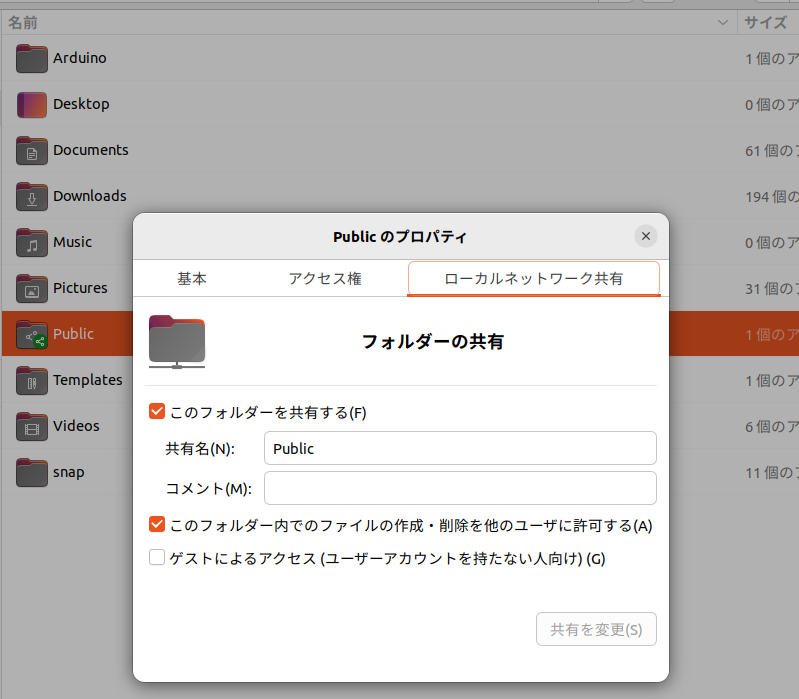
今回始めてフォルダーを共有する場合、次の様なダイアログが表示されるのでインストールする。なお、このダイアログは背景で記載した、残り1台は不明としたノートPC。このPCではファイル共有をしたことがなかったようだ。
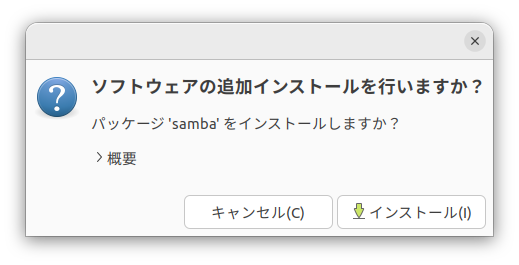
”このフォルダーを共有する”だけでは、外部からアクセスできないので、pdbeditを使って、Sambaユーザーとそのパスワードを設定する。
これはpdbeditのman。オプションは-Lでユーザーのリスト表示、-au でユーザーの作成とパスワードの設定。これで、Sambaユーザーを作成、共有時のユーザー名とパスワードを設定する。
PDBEDIT(8)                                         System Administration tools                                        PDBEDIT(8)

NAME
       pdbedit - manage the SAM database (Database of Samba Users)

SYNOPSIS
       pdbedit [-L|--list] [-v|--verbose] [-w|--smbpasswd-style] [-u|--user=USER] [-N|--account-desc=STRING]
        [-f|--fullname=STRING] [-h|--homedir=STRING] [-D|--drive=STRING] [-S|--script=STRING] [-p|--profile=STRING]
        [-I|--domain=STRING] [-U|--user SID=STRING] [-M|--machine SID=STRING] [-a|--create] [-r|--modify] [-m|--machine]
        [-x|--delete] [-b|--backend=STRING] [-i|--import=STRING] [-e|--export=STRING] [-g|--group] [-y|--policies]
        [--policies-reset] [-P|--account-policy=STRING] [-C|--value=LONG] [-c|--account-control=STRING]
        [--force-initialized-passwords] [-z|--bad-password-count-reset] [-Z|--logon-hours-reset] [--time-format=STRING]
        [-t|--password-from-stdin] [-K|--kickoff-time=STRING] [--set-nt-hash=STRING] [-?|--help] [--usage]
        [-d|--debuglevel=DEBUGLEVEL] [--debug-stdout] [--configfile=CONFIGFILE] [--option=name=value]
        [-l|--log-basename=LOGFILEBASE] [--leak-report] [--leak-report-full]

DESCRIPTION
       This tool is part of the samba(7) suite.

       The pdbedit program is used to manage the users accounts stored in the sam database and can only be run by root.

       The pdbedit tool uses the passdb modular interface and is independent from the kind of users database used (currently
       there are smbpasswd, ldap, nis+ and tdb based and more can be added without changing the tool).

       There are five main ways to use pdbedit: adding a user account, removing a user account, modifying a user account,
       listing user accounts, importing users accounts.
以上の設定で接続できる。はず… なのだが… できぬ。
原因調査
アクセス可能、不可能なマシンでのsamba関連のパッケージ関連のバージョンを確認、一部にvfs関連がインストールされているが、これはアクセス可能、不可能なマシン双方に存在するので関係なし。
$dpkg -l | grep samba
ii  python3-samba                                 2:4.15.13+dfsg-0ubuntu1.5                amd64        Python 3 bindings for Samba
ii  samba                                         2:4.15.13+dfsg-0ubuntu1.5                amd64        SMB/CIFS file, print, and login server for Unix
ii  samba-common                                  2:4.15.13+dfsg-0ubuntu1.5                all          common files used by both the Samba server and client
ii  samba-common-bin                              2:4.15.13+dfsg-0ubuntu1.5                amd64        Samba common files used by both the server and the client
ii  samba-libs:amd64                              2:4.15.13+dfsg-0ubuntu1.5                amd64        Samba core libraries
$ dpkg -l | grep samba
ii python3-samba 2:4.15.13+dfsg-0ubuntu1.5 amd64 Python 3 bindings for Samba
ii samba 2:4.15.13+dfsg-0ubuntu1.5 amd64 SMB/CIFS file, print, and login server for Unix
ii samba-common 2:4.15.13+dfsg-0ubuntu1.5 all common files used by both the Samba server and client
ii samba-common-bin 2:4.15.13+dfsg-0ubuntu1.5 amd64 Samba common files used by both the server and the client
ii samba-dsdb-modules:amd64 2:4.15.13+dfsg-0ubuntu1.5 amd64 Samba Directory Services Database
ii samba-libs:amd64 2:4.15.13+dfsg-0ubuntu1.5 amd64 Samba core libraries
ii samba-vfs-modules:amd64 2:4.15.13+dfsg-0ubuntu1.5 amd64 Samba Virtual FileSystem plugins
sambaの設定は以下のファイル。アクセス可能、不可能で内容に相違なし。
/etc/samba/smb.conf
共有フォルダの設定は以下のフォルダに記載、こちらもアクセス可能、不可能で内容に相違なし。
/var/lib/samba/
原因不明である。
解決
原因不明で悩んでいたが、アクセスできるPCはファイアーウォールが非アクティブであることを発見!
とりあえず、すべてのマシンのファイアーウォールをアクティブにして、以下のコマンドを実行。ポートを開いた。
sudo ufw allow samba
以上、問題可決しました。