Raspberry pi 5b始動
 kimi
kimiRaspberry Pi 5を始動させた。稼働中のRaspberry Piはすべて10分ごとにCPU温度を記録している…と思う。今回、Raspberry Pi ηが記録から漏れていたので、今回5Bと同時に記録を開始している。(追記: 何ということでしょう、ζも漏れていた)
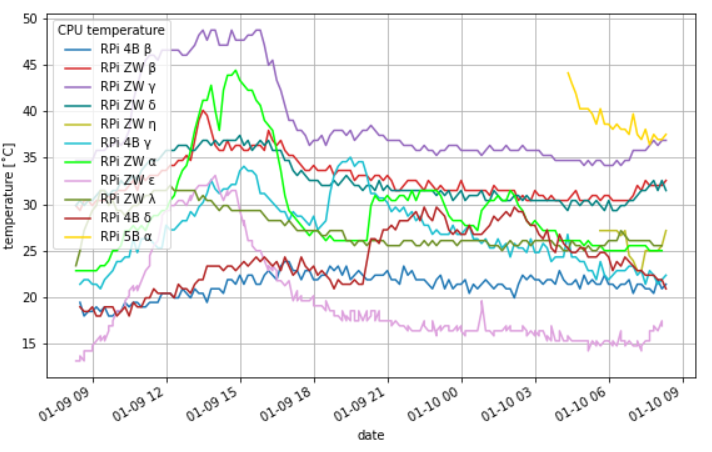
cronで定期的にPythonスクリプトを実行してMySQLサーバーに温度の記録を行っている。スクリプトを実行するに伴い不足しているライブラリをインストールする必要があるのだが、次のような警告がでた。
04:16 rpi@raspberrypi5b-alpha:~/Documents/CPU_temp
$python3 -m pip install pymysql
error: externally-managed-environment

× This environment is externally managed
╰─> To install Python packages system-wide, try apt install
    python3-xyz, where xyz is the package you are trying to
    install.

    If you wish to install a non-Debian-packaged Python package,
    create a virtual environment using python3 -m venv path/to/venv.
    Then use path/to/venv/bin/python and path/to/venv/bin/pip. Make
    sure you have python3-full installed.

    For more information visit http://rptl.io/venv

note: If you believe this is a mistake, please contact your Python installation or OS distribution provider. You can override this, at the risk of breaking your Python installation or OS, by passing --break-system-packages.
hint: See PEP 668 for the detailed specification.
今回は、以下のようにシステムのPython3にライブラリをインストールしてしまった。
04:19 rpi@raspberrypi5b-alpha:~/Documents/CPU_temp
$sudo apt install python3-pymysql
Reading package lists... Done
Building dependency tree... Done
Reading state information... Done
Suggested packages:
  python-pymysql-doc
The following NEW packages will be installed:
  python3-pymysql
0 upgraded, 1 newly installed, 0 to remove and 0 not upgraded.
Need to get 42.2 kB of archives.
After this operation, 177 kB of additional disk space will be used.
Get:1 http://deb.debian.org/debian bookworm/main arm64 python3-pymysql all 1.0.2-2 [42.2 kB]
Fetched 42.2 kB in 0s (178 kB/s)
Selecting previously unselected package python3-pymysql.
(Reading database ... 127342 files and directories currently installed.)
Preparing to unpack .../python3-pymysql_1.0.2-2_all.deb ...
Unpacking python3-pymysql (1.0.2-2) ...
Setting up python3-pymysql (1.0.2-2) ...
エラーのメッセージ内に以下の様な記述があるので、Pythonの仮想環境で利用するのが好ましいようだ。さて、これまでこの様なエラーは出ていなかった。Raspberry Pi OSのバージョンを確認していないので、新旧の違いなのか、あるいは、今回64bitをインストールしたので、32bitと64bitの違いなのか定かではないが、いずれにしてもUbuntuと同様にPythonの仮想環境を構築する必要がありそうだ。
If you wish to install a non-Debian-packaged Python package, create a virtual environment using python3 -m venv path/to/venv. Then use path/to/venv/bin/python and path/to/venv/bin/pip. Make sure you have python3-full installed.
追記: 気になったので、バージョンを確認。
bookwormになってた。
09:13 rpi@raspberrypi4b-gamma:~
$uname -a
Linux raspberrypi4b-gamma 6.1.21-v8+ #1642 SMP PREEMPT Mon Apr  3 17:24:16 BST 2023 aarch64 GNU/Linux

09:13 rpi@raspberrypi4b-gamma:~
$lsb_release -a
No LSB modules are available.
Distributor ID: Raspbian
Description:    Raspbian GNU/Linux 11 (bullseye)
Release:        11
Codename:       bullseye


09:14 rpi@raspberrypi5b-alpha:~
$uname -a
Linux raspberrypi5b-alpha 6.1.0-rpi7-rpi-2712 #1 SMP PREEMPT Debian 1:6.1.63-1+rpt1 (2023-11-24) aarch64 GNU/Linux

09:15 rpi@raspberrypi5b-alpha:~
$lsb_release -a
No LSB modules are available.
Distributor ID:	Debian
Description:	Debian GNU/Linux 12 (bookworm)
Release:	12
Codename:	bookworm
あと、初回起動時にデータベースデーブルがないってエラーが得るので対処する。
04:19 rpi@raspberrypi5b-alpha:~/Documents/CPU_temp
$python3 CPU_Temp_sql.py
Traceback (most recent call last):
  File "/home/rpi/Documents/CPU_temp/CPU_Temp_sql.py", line 64, in <module>
    row_num = cur2.execute("SELECT COUNT(*) FROM environment;").fetchone()[0]
              ^^^^^^^^^^^^^^^^^^^^^^^^^^^^^^^^^^^^^^^^^^^^^^^^^
sqlite3.OperationalError: no such table: environment

During handling of the above exception, another exception occurred:

Traceback (most recent call last):
  File "/home/rpi/Documents/CPU_temp/CPU_Temp_sql.py", line 99, in <module>
    sql = 'INSERT INTO environment VALUES (\'%s\', %s, %s, %s)' % (db_data)
          ~~~~~~~~~~~~~~~~~~~~~~~~~~~~~~~~~~~~~~~~~~~~~~~~~~~~~~^~~~~~~~~~~
TypeError: not enough arguments for format string